Loopy reads your document. Drafts the drills in about five minutes.
Step two of the HeyLoopy flow. You uploaded a document. Loopy turns it into short drills, each tied to a specific passage your learner can return to. This page explains what gets drafted, how the questions stay anchored to your source, and what control you have before any drill reaches your team.
Short questions. Anchored to passages. Built for sixty-second recall.
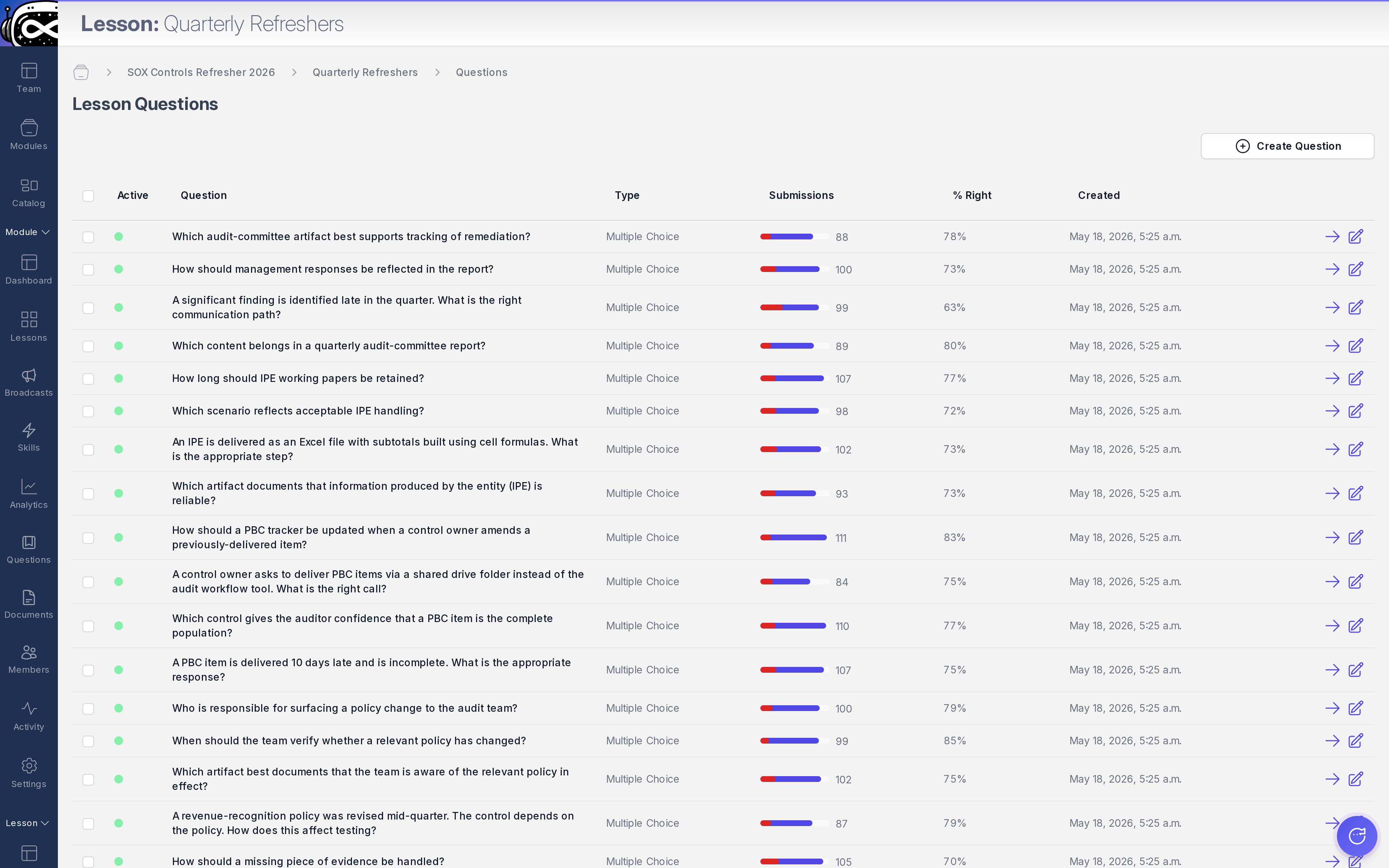
From a typical SOP or policy memo, Loopy drafts a set of drills that fits the 60-second daily-drill loop. Two question shapes are used today: multiple choice, and pairing. Every drill is tied to a specific passage in your document, which means the learner can always trace the question back to the source they are responsible for remembering.
Multiple choice
A scenario or fact-pattern from the document. Three or four answer options. One correct, plausible distractors. Each option is grounded in language that appears in or naturally extends the source passage. No tricks, no trivia, no GMAT-style misdirection.
Pairing
Two columns of items the learner has to match: a regulator and the typology they care about, a code and the procedure it triggers, a symptom and the bundle that responds to it. Faster to answer than multiple choice, harder to game with a guess, good for terminology drilling.
§ 02 · How the drafting works
Loopy reads the document, identifies the passages worth drilling, then drafts.
When you upload a document, Loopy parses it into passages (natural sections, headings, paragraphs that can stand alone). For each passage, Loopy decides whether it's drillable (does it contain a fact, a procedure, a definition someone could be tested on?) and what shape the drill should take (multiple choice for scenarios; pairing for terminology, code-to-procedure mappings, symptom-to-bundle lookups).
The drafting is grounded in your specific document, not in a generic question bank. Loopy does not pull questions from a library and try to map them to your content. Loopy writes questions for your content. That means the questions match your terminology, your version of the procedure, your regulator's language.
Admin · Question tableThe drafted-drills review screen. Each row is one question, tied to its source passage.
heyloopy.com/admin/questions
§ 03 · What stays grounded in your source
Every drill traces back to a passage. Always.
A drafted drill is never decoupled from its source. The question, the correct answer, and the explainer the learner sees after answering all anchor to a specific passage in your document. When a learner gets a drill wrong, they can be sent directly to the source paragraph that explains the answer. When you edit the source paragraph, the drills derived from it queue for re-review.
For your team, this is the property that turns a drill answer into a record you can stand behind: "this learner was tested on this specific procedure from this document, on this date, with this result." Per-person, per-skill, per-date, timestamped and retained. See retention records and export for the export specifics.
§ 04 · What you control before drills ship
Drafts go through review before they reach a learner.
Every drafted drill enters your admin review queue first. You can read each question, see the source passage it came from, edit the wording, swap a distractor, mark a draft for rejection, or approve. Nothing ships to a learner without your sign-off. The default is "draft, awaiting review." The fast path is one click per drill once you've read it.
This is the part of the flow that earns the audit conversation later. AI drafting at scale, with human review at the gate. See drill quality control for the review screen, the keyboard shortcuts, and the audit log of who approved what when.
Approve as-is
Read the draft, agree with the wording, ship it. Common for fact-shaped questions where Loopy's draft mirrors the source closely.
Edit and approve
Tweak a distractor, sharpen a question stem, clarify ambiguous wording. The edit is logged; the source-passage anchor stays.
Reject and replace
Some questions are not worth drilling, even if Loopy drafted them. Reject; Loopy can draft a replacement from a different passage on request.
§ 05 · What Loopy does not do
No fabrication. No off-source content. No model training on your data.
Doesn't fabricate
If your document doesn't say something, Loopy doesn't draft a question pretending it does. Questions trace back to passages; passages live in your document.
Doesn't pull from generic content
No prefab question banks. No "compliance training in a box" template applied over your material. The drills are specific to what your document says, in your wording.
Doesn't train on your content
Your document is not used to train HeyLoopy's models or any third-party AI provider's models. Full policy on trust and data residency.
Upload one document. See what Loopy drafts in five minutes.
Free for teams up to 3 seats. No card. The drafts go straight to your review queue. Approve or edit. Ship when you're ready.