3 seats free

Feature · Quality control

AI drafts the drills.
A human approves every one.

Loopy writes drill questions from your documents in minutes. None of them reach a learner without an admin reading, optionally editing, and approving. This page is the review screen, the edit affordances, the keyboard shortcuts, and the audit log behind that gate.

§ 01 · The default is draft, awaiting review

No drill ships until you approve it.

When Loopy finishes drafting from an uploaded document, every drill enters a review queue scoped to that module. The status is "draft." Learners assigned to the group do not see drafts. The daily drill rotation only pulls from approved questions. The default cannot be inverted; there is no admin setting that lets drafts auto-publish.

This is the gate that lets you stand behind the questions your team sees. When a stakeholder asks "how do you know the questions your team is being tested on are correct?", the answer is: a named human read each one and approved it. The product tracks that fact internally so you can refer back to it. See audit evidence export for how learner-answer data is exported.

§ 02 · The review screen

One row per drill. Question, source passage, status, action.

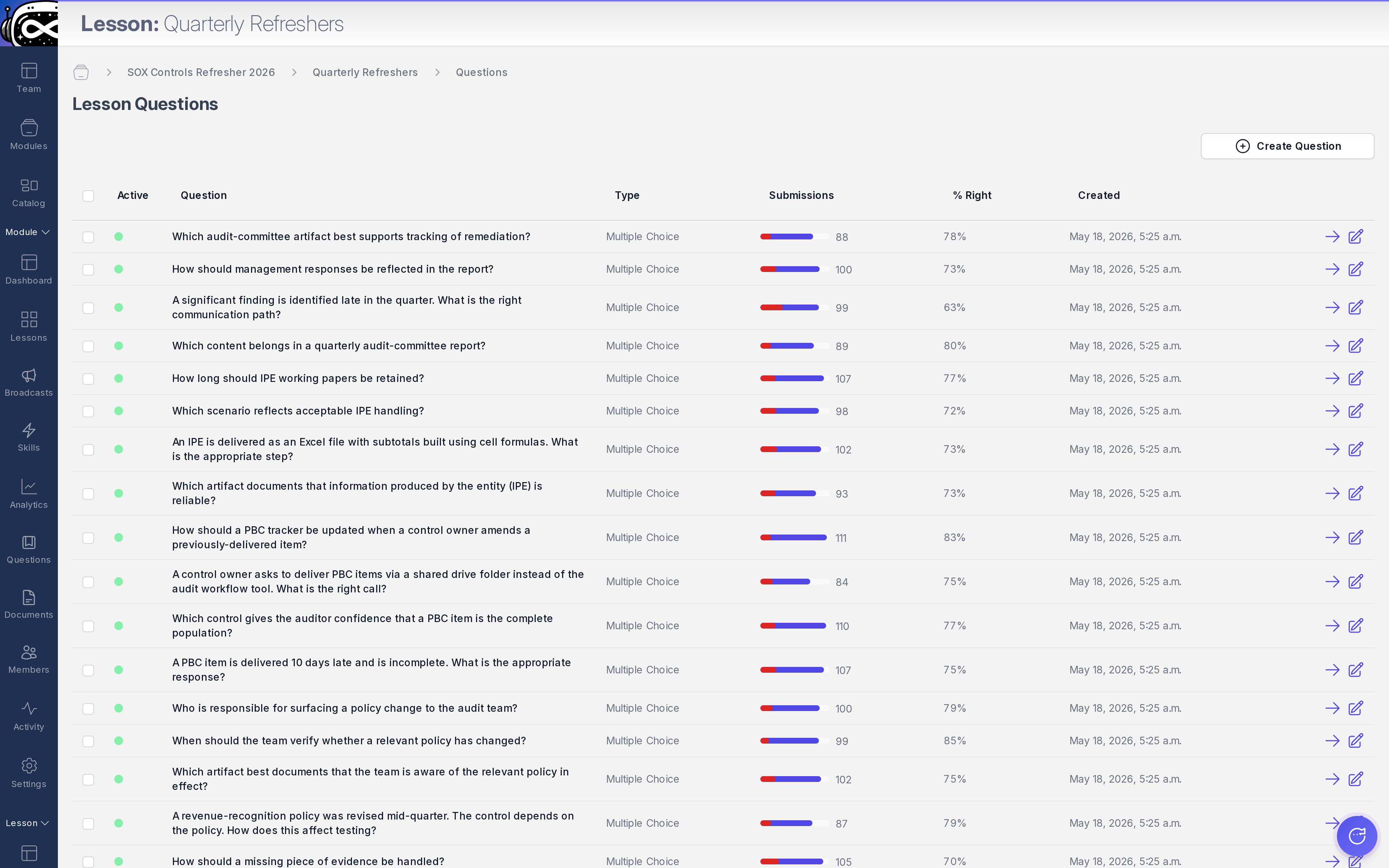
The question table for a module lists every drafted drill. For each row, you see the question stem, the answer options, the source passage it traces back to, and the current status (draft, edited, approved, rejected). Click into a row to expand the full review pane: the source passage on the left, the drill on the right, edit fields inline.

Admin · Question table The review queue. One row per drill, source passage visible, approval one click away.
heyloopy.com/admin/questions
HeyLoopy question table: the admin review queue showing every drafted drill question, the source passage each is tied to, and the approval status.

The review pane is designed for the speed of an L&D director or compliance officer doing a batch of fifty drills in a sitting. Read the source passage. Read the drill. If it matches, approve and the next row loads. If the wording is off, edit inline and approve. If the question shouldn't exist at all, reject and Loopy can draft a replacement from a different passage on request.

§ 03 · What you can edit

Every field. Nothing is locked.

Question stem

The wording of the question itself. Tighten ambiguous phrasing, swap "they should" for "the operator must," match your house style. The edit is tracked with the timestamp and the admin's identity.

Answer options

The correct answer. The distractors. The order. If Loopy drafted a distractor that's technically also correct, swap it. If two options are too similar, rewrite one.

The explainer

What the learner sees after answering. Add context, cite the procedure code, link the relevant page of the SOP. This is where your subject-matter knowledge gets baked into the drill.

The source-passage anchor

If Loopy tied the drill to the wrong passage, re-anchor it. Rare, but the affordance exists. The new anchor is what the learner sees on a wrong-answer "show me the source."

§ 04 · Tracking what changed

Who approved, what they approved, when, and what changed.

Each action in the review queue is tracked. Approval. Rejection. Edit (with before/after content). Re-anchor to a different passage. The tracking is per-admin, per-drill, with timestamps and the document version that was active at the time of approval. It is the system-of-record for what your team did inside HeyLoopy.

A note on scope: this is technical change tracking, not a compliance-grade audit log. It answers "who edited what when" inside the product. Compliance-grade auditing of exam questions — the kind a regulator or external auditor would accept as a controlled-record artifact — is on the near-term roadmap, not shipping today. The shape will likely follow the pattern of the existing tracking, with controls and retention guarantees added.

§ 05 · How it feels in practice

A batch of fifty drills, reviewed in one sitting.

Compliance officer

Uploads a typology update at 9:05am. Drafts ready at 9:15am. Reviews thirty drills over coffee, edits two distractors, rejects one off-topic question, approves the rest. Assigns to BSA officers by 10am. Audit log captured automatically.

Financial compliance →
EHS supervisor

Reviews the new LOTO drill set after editing the SOP. Most drafts approved as-is; one re-anchored to a more specific passage; explainers tightened to match plant terminology. Twenty drills in twenty minutes.

Frontline EHS →
Clinical educator

Reviews drafts for a sepsis bundle. Two drafts rewritten to match the unit's specific protocol variation. One added explainer linking to the hospital's internal escalation pathway. Approved batch shipped to night-shift nurses for the next day's drill.

Clinical training →

See the review queue in your own account.

Free for teams up to 3 seats. Upload a document, review what Loopy drafts, approve only what you'd put your name on.