3 seats free

Feature · Step 03 · Groups

Assign by role, shift, region, plant.
Built for distributed frontline operations.

Step three of the HeyLoopy flow. The drills exist and are reviewed; now they get to the right people. This page explains how groups work, how a single module reaches across roles, sites, shifts, or regions, and what happens when people rotate in and out of those groups.

§ 01 · What a group is

A group is the axis that matters to you. Define it any way.

A group in HeyLoopy is the set of people who should drill on the same modules. The axis is yours to choose: a role (BSA officer, branch teller, line supervisor), a shift (night shift at the Coimbatore plant), a region (West-coast retail), a site (the Tirupur facility), a function (clinical educators on the cardiac floor), or any combination. The product does not impose an org structure; it adapts to yours.

By role

Every BSA officer across the bank drills on typology updates. Every line supervisor across the plant drills on LOTO. The role is the unifying axis; geography doesn't matter.

By site

The Bangalore plant has a different equipment mix than the Coimbatore plant. Assign the site-specific SOP module to the site-specific group. Same module shape; different content per site.

By any combination

Night-shift supervisors at the Querétaro maquila. Med-surg nurses on the cardiac floor at the downtown hospital. The intersection is the group.

§ 02 · How assignment works

Pick a module. Pick a group. The drills start tomorrow morning.

Assignment is one screen. You select the module (the document Loopy drafted drills for), you select the group (the people who should drill on it), and you confirm. The next morning, every learner in that group receives the day's drill in their phone browser. The first drill of a newly assigned module is short — typically the most foundational question — to ease the start.

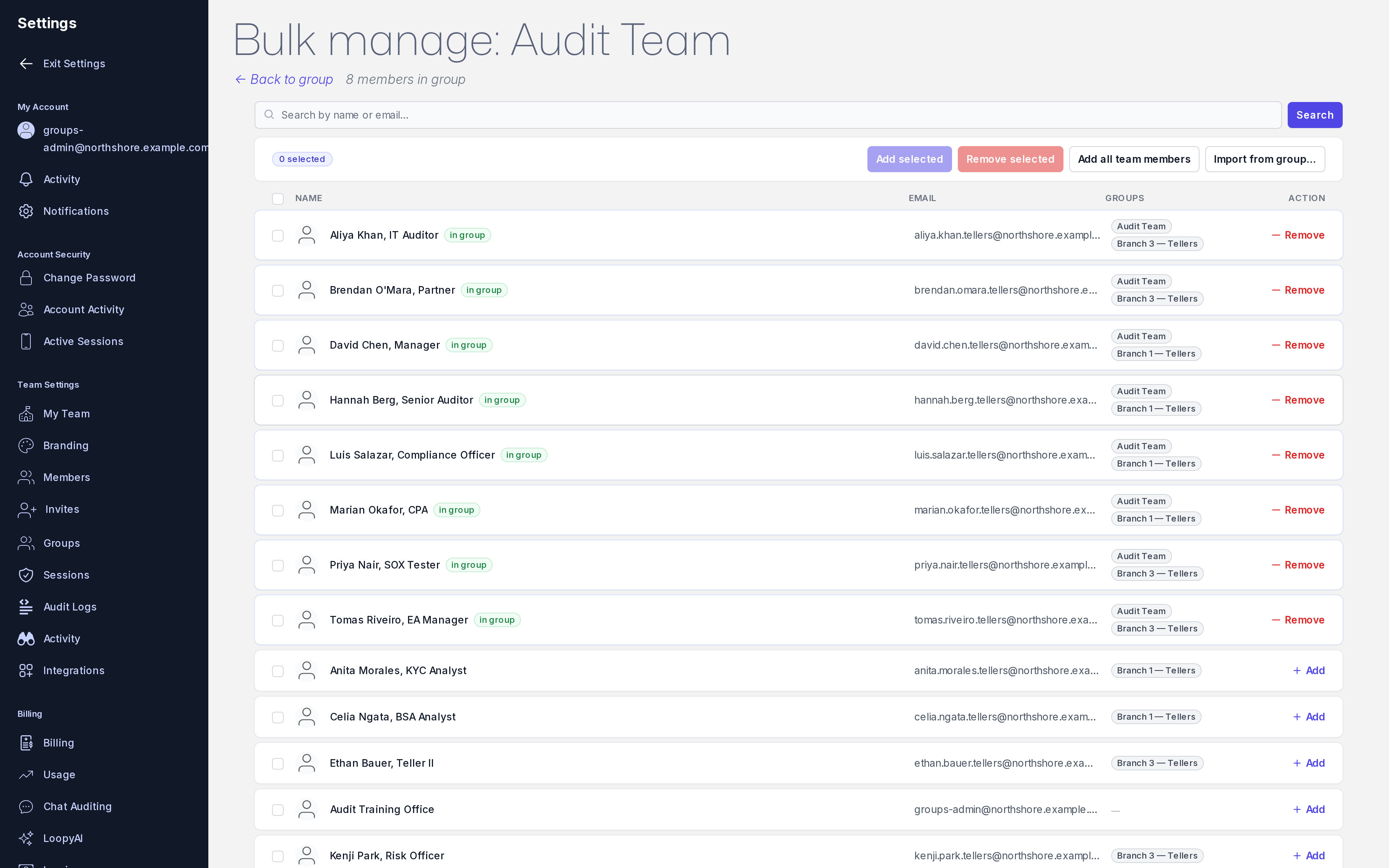
Admin · Group management The group bulk-manage view. Each row is a group; assignments and membership stay synchronized.
heyloopy.com/admin/groups
HeyLoopy group bulk-manage view: a list of groups (by role, site, shift), the modules assigned to each, and the membership controls for adding or removing learners.

Cross-assignment is supported: the same person can be in multiple groups (the BSA officer who is also a regional team lead drills on both the typology module and the leadership-onboarding module). HeyLoopy serves them one drill at a time, rotating across the modules they're assigned to.

§ 03 · When people rotate in and out

New hire on Monday. Drilling by Tuesday. Departed Friday. Removed Friday.

Frontline teams rotate. New hires arrive. People change shifts. Contracts end. HeyLoopy is built for this. Add a person to a group, and they pick up the group's assigned modules from the beginning — their mastery starts at zero on those skills, and the heatmap shows them as the obvious intervention candidate until they catch up.

Remove a person from a group, and their drills stop. Their historical drill answers are preserved (so the audit-evidence record stays intact), but they no longer receive the daily drill for that module. Removing someone from all groups effectively pauses their HeyLoopy account; deletion is a separate, deliberate admin action.

Add in bulk

Paste a list of email addresses or employee IDs. HeyLoopy provisions accounts and adds them to the group in one step. Useful for new-cohort onboarding, shift changes, or annual reorganizations.

Sync with your HRIS (roadmap)

Today: manual provision and remove via admin. Roadmap: HRIS sync (BambooHR, Workday, Personio) so group membership tracks employment status automatically. Timeline depends on customer demand; not shipping in 2026 Q2.

§ 04 · Why this shape, not an LMS shape

Groups exist for the drill cadence, not for course-completion bookkeeping.

In a traditional LMS, group membership exists to track who was assigned which course and who completed it. HeyLoopy uses groups for a different purpose: who drills daily on which module. The membership doesn't expire when the "course" is "complete," because the drill never expires — retention is the goal, not completion.

This is the part of the product that often surprises L&D directors used to LMS-shaped tooling. A group is not a class roster you graduate from. It is the set of people you want continuously sharp on a procedure. The heatmap is the artifact that tells you how sharp they are. See HeyLoopy alongside your LMS for how the two coexist, and the mastery heatmap for what you do with the resulting data.

§ 05 · Three example assignments

What groups look like in practice.

Mid-size bank

Group: all BSA officers + branch tellers across forty-eight branches. One module per typology update. Assignment changes when the typology list does, not when an annual training cycle resets.

Financial compliance →
Multi-site manufacturer

Groups: line supervisors at each plant, separately. Same module shape (LOTO, lockout-tagout), site-specific content. Mastery measured per site, by shift, so the EHS team knows which plant needs which intervention.

Manufacturing EHS →
Distributed services company

Groups: customer-success managers across regions, field-deployed engineers on rotation, sales engineers by territory. Different modules per group; daily drills run on personal phones during transit between accounts.

Customer-facing teams →

Set up your first group. Run drills tomorrow morning.

Free for teams up to 3 seats. No card. Add yourself, add a colleague, point a module at the group, see what arrives tomorrow.