3 seats free. No card. Upgrade per seat as you grow.
Free forever for teams up to 3 seats.
Your newest hires learned from YouTube, not textbooks. Here's why your training is failing them.
Free download. No credit card required.
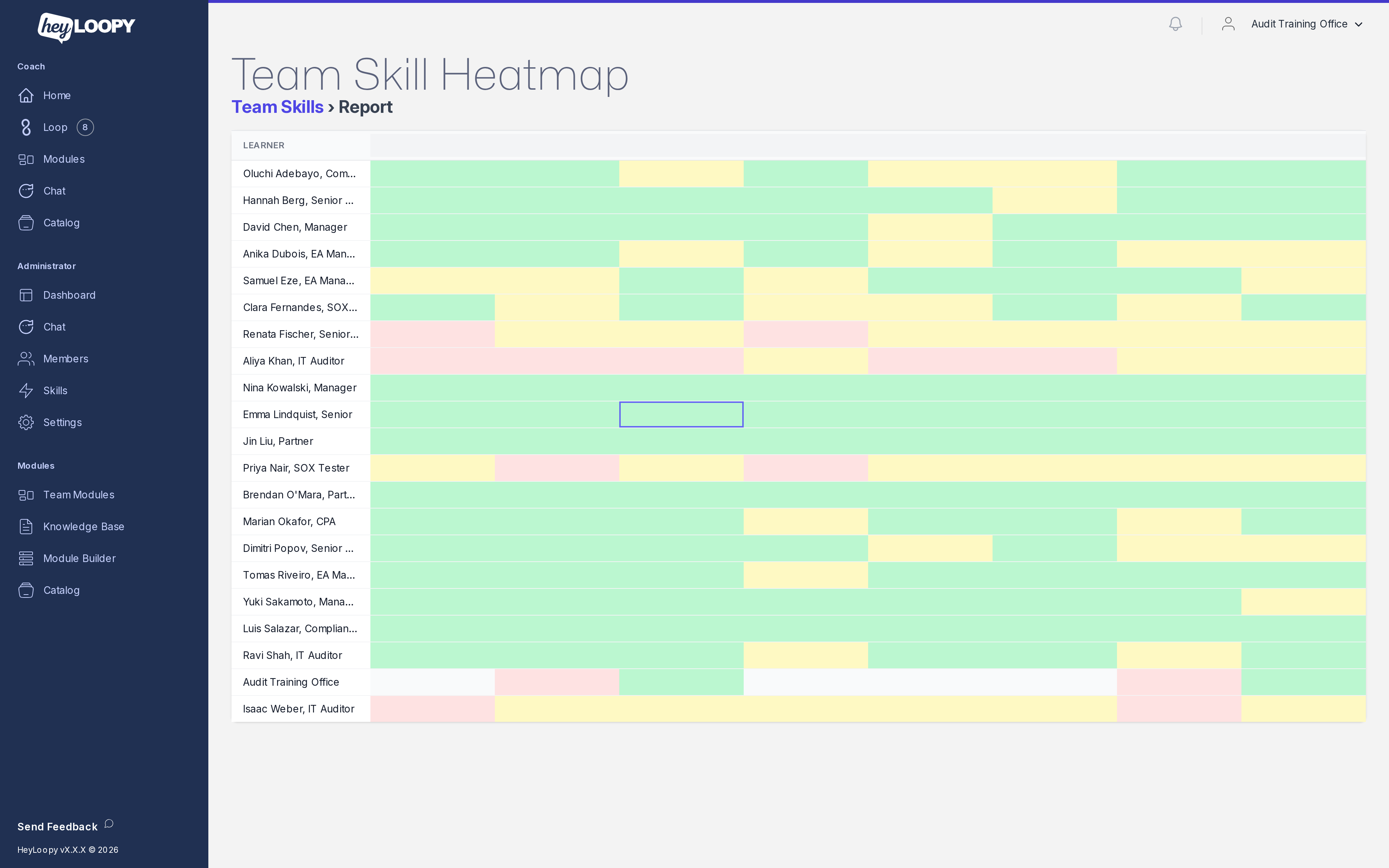
The heatmap is the one screen an L&D lead, compliance officer, or ops director opens when the question is "who needs intervention this week." Rows are people. Columns are skills. Cells are colored by mastery. Where the cells turn pale, you act.
Every learner on your team gets a row. Every skill you've drilled gets a column. Every cell holds a number between 0 and 100 percent: how often that learner has answered drills on that skill correctly, weighted toward the last few weeks.
Strong cells are green. Weak cells are pale or amber. A single glance and you can see: which person is sliding, which skill is sliding for everyone, where intervention pays off.
One learner. The supervisor who runs night shift. The new hire in their second week. The compliance veteran on their fourteenth typology update.
One skill. A specific SOP, policy section, or typology. Not "compliance training" as a blob; the specific bundle, the specific procedure, the specific check.
A percent. Computed from real drill answers, not survey clicks or completion ticks. The number that holds up when the auditor asks "how do you know they remember?"

A specific person is sliding on most skills. The intervention is individual: a one-on-one with the supervisor, a refresher path, a check on whether they're getting the drills at all. Common pattern after a leave of absence or a shift change.
A specific skill is sliding for the whole team. The intervention is structural: rewrite the source document, add a worked example, re-author the drill, run a focused review. The heatmap surfaced a content problem, not a people problem.
A specific person on a specific skill, despite the rest of the team being green. The intervention is targeted: a tailored drill set, a peer pair-up, sometimes a role-fit conversation. Costs an hour. Pays back the next time the auditor asks "what did you do about it?"
In every pattern the next action is plain. The heatmap is not a dashboard you stare at; it is the screen that tells you what to do this week.
Mastery in HeyLoopy is percent correct over time on the drills assigned to a role, weighted so that last Tuesday's answer counts more than last March's. The math is the science of spaced practice — built on a hundred and forty years of memory research and tested across the modern training literature.
What it is not: a quiz score, a course completion, or a self-rated confidence number. Those measure assignment, not retention. An LMS shows you the training was completed. The heatmap shows you the team still remembers.
For the formal computation — how the weighting works, what counts as a drill answer, how forgetting curves shape the decay — see the retention page, which walks through the three admin views (heatmap is one of three) and the underlying definition of mastery.
The heatmap is also the artifact your audit team uses to answer the question regulators actually ask: how do you know the front line learned the procedure you updated? Mastery is recorded per person, per skill, per source-document version. When you edit an SOP, the drills regenerate in minutes and the mastery clock resets on the affected skill.
The data exports to PDF and CSV. The artifact shape is generic — it works for whichever regulator your team answers to. See audit evidence export for the export specifics, or regulated audit for the buyer-shaped walkthrough.

"I have a content problem in product knowledge for the southwest region." The heatmap surfaces that the new SKU is pale in three out of four teams. The fix is one rewrite of the source doc; drills regenerate in minutes.
Upskilling →"The typology updated three weeks ago. Is the front line current?" The heatmap shows per-person mastery on that specific update. The look-back artifact is one CSV export away.
Regulated audit →"Which supervisor on which shift is the intervention candidate this week?" Sort the heatmap by mastery decline. The bottom three rows are the conversation list for Monday morning.
Onboarding →Upload a policy, run drills for a week, open the heatmap. Free for teams up to 3 seats. No card. First drill in five minutes.